The problem

I run an algo trading bot. It lives on a server and trades 24/7 against the NYSE and BOATS. It doesn’t sleep, and it doesn’t wait for me.

The catch with an always-on bot is that it still needs a human who can watch it and step in. When a position moves hard, when the order flow turns, when there’s a trade the bot won’t take on its own, I want to pull up the charts, read the book, and execute right then. So the problem was never compute. The bot has the server for that. The problem was me: I’m not always at my desk, and the market doesn’t care where I am.

What I actually needed was a window into my own setup that I could carry anywhere. Something pocket-sized I could yank out at a café, a hotel, or the back of an Uber and, within seconds, be staring at my trading desk and ready to act. A thin client built for one thing: fast reactions, on any network.

That ruled a few things out quickly. A MacBook Air? I had one until two weeks ago and returned it over a defective trackpad, and it’s too big to live in a jacket anyway. A tablet? You lose the keyboard, and the hotkeys to flick between the chart and the terminal are the speed. I wanted a real, tiny computer.

Why the Kooforway

Since the server does the work, the laptop just has to reach it and render TradingView without choking. So I wasn’t after the fastest machine, only the smallest one that’s still usable for live trading.

That’s a real category now: 8-inch Windows mini-laptops, mostly running Intel’s N150 (quad-core, boosts to 3.6GHz, ~10–15% quicker than the old N100, 6W base TDP). Nothing exciting, but plenty for a browser and a few SSH sessions. With 12GB of RAM it stops being a toy.

I went with the Kooforway (the model’s literally called the Mini): 8 inches, ~0.78kg, 12GB RAM, a 512GB SSD, and a touchscreen that folds flat into a tablet. Around $300–350 on AliExpress; I paid a bit more on Amazon to skip the wait. One heads-up: Kooforway, Koofan, Koosmile, X-Plus Piccolo are all the same ODM hardware with different stickers. You’re picking a shape, not a brand.

Unboxing

It feels good in the hand: machined aluminum, matte finish, a hinge that flips the screen 180° into tablet mode. For under $400 from a brand I’d never heard of, that surprised me. It ships with Windows 11 Pro, a rechargeable stylus, and a pile of accessories, including an Ethernet adapter I wrote off as junk and then used twice when nothing else would get me online. Don’t disrespect the dongle.

Killing Windows

Windows 11 on an 8-inch screen is rough. The taskbar’s too thick, everything’s over-padded, and at this size every wasted pixel is a pixel of chart you don’t get back. So I wiped it for Lubuntu, the lightweight LXQt spin of Ubuntu. For “SSH in and watch charts” the OS barely matters anyway; the browser does the work. Lubuntu idles in a couple hundred MB and gives the screen back.

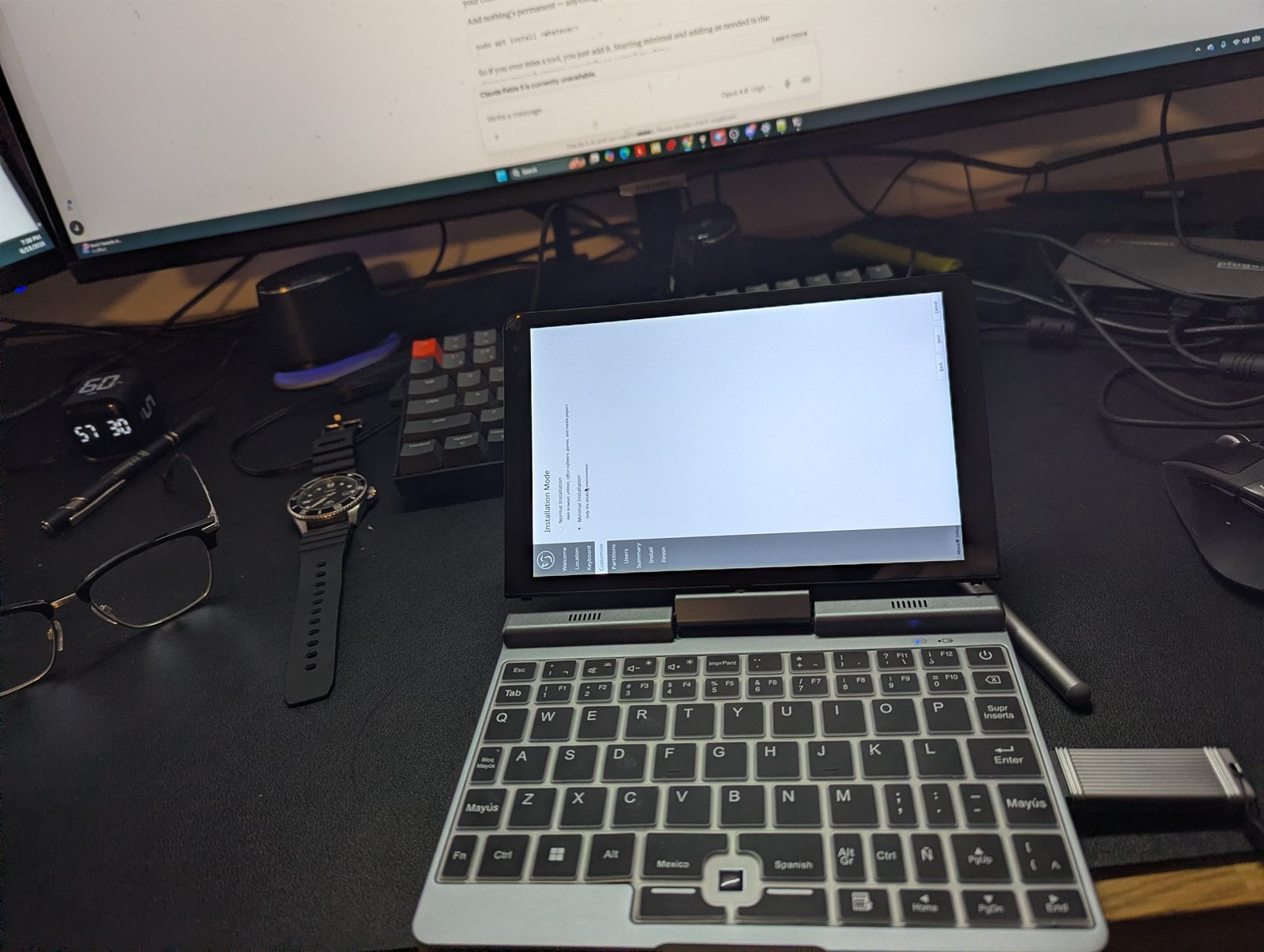
Lubuntu’s Calamares installer running on the Kooforway Mini, with Minimal Installation selected Wiping Windows for Lubuntu. Minimal install to keep it lean. And yeah, that’s a Spanish/Mexico keyboard layout. ODM life.

That’s where the fun started.

The challenges (a partial list)

Lesson 1: the screen boots sideways

First boot, the display came up rotated 90°. That’s just how a lot of these convertibles are: the panel’s mounted in portrait and the OS has no idea. Looks broken, isn’t. (The fix grew into its own saga, below.)

Lesson 2: I encrypted myself out of my own laptop

I turned on full-disk encryption during install. Felt responsible. Then it wouldn’t boot, just looping back to the passphrase prompt and into emergency mode. The internal keyboard wasn’t awake that early in boot, so I couldn’t even type the passphrase it demanded. Locked out of a laptop with nothing on it yet. I reinstalled without encryption and a strong login password instead. Good advice in general, wrong call on this particular machine.

Lesson 3: the single USB-C port that giveth and taketh away

One port. You can’t charge and plug anything else in at the same time, which bit me constantly during setup. The fix is a USB-C hub with power passthrough. On a one-port machine that’s mandatory, not an accessory.

Setting the screen straight (for good)

The rotation is really two problems wearing one trenchcoat.

The display: one xrandr command rotates it upright, but only with the panel’s real native resolution, which was 800×1280 (portrait), not the 1920×1200 I’d assumed.

xrandr --output DSI-1 --mode 800x1280 --rotate right

The pen and touch: rotating the display doesn’t rotate the input, so you tap one spot and the cursor lands elsewhere. A transformation matrix remaps it:

xinput set-prop "PEN_DEVICE" "Coordinate Transformation Matrix" 0 1 0 -1 0 1 0 0 1

(Those numbers just mean “swap the axes, flip one,” which is what a 90° rotation is.)

Last trap: in a startup script, both commands have to run under X11 (Wayland silently ignores them) and need a sleep 3 up front, or they fire before the display’s awake. Sort that out and it boots upright with the pen aligned every time. That was the first moment it felt like it’d actually work.

Tailscale: trading from any network

This is the part that nearly beat me, and it’s the part that actually matters for trading from the road.

The whole point of the laptop is that it roams, and every network hands you a new public IP. Lock the trading server’s firewall to “my IP only” and you lock yourself out the moment you move. I burned an hour on firewall whack-a-mole and, at one low point, locked every machine I own out of the server. Not ideal when there’s a live bot on the other side.

The fix is Tailscale: a private mesh over the internet. Install it on the laptop and the server, sign both into one account, and each gets a stable 100.x.x.x address that travels with the machine.

curl -fsSL https://tailscale.com/install.sh | sh
sudo tailscale up
ssh root@100.x.x.x

…reaches the server from anywhere. I tested it on a phone hotspot mid-session and SSH’d straight in like nothing changed. Better still, since access rides the mesh now, I closed public SSH off the internet entirely. The port scanners can’t even find the door, which is exactly what you want for a box that moves money.

The trading desk

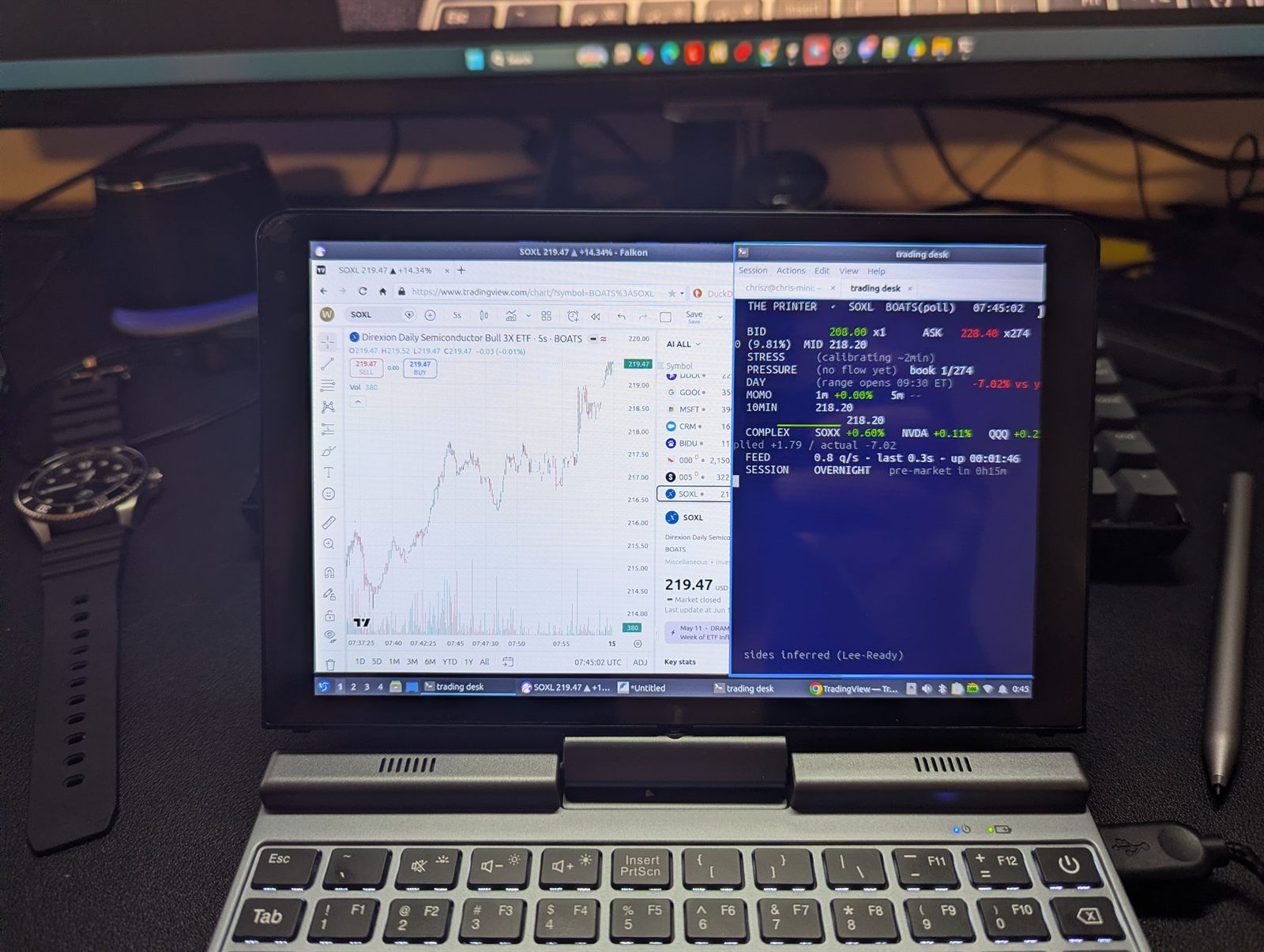
With the machine sorted and the server one command away, here’s what actually runs on it. Two windows, side by side: TradingView for the chart, and my own terminal wired to the bot. It streams what the bot sees in real time, bid and ask, order-book pressure, momentum, the related names, and where we are in the session. The bot trades on its own, but the second I want to step in, everything I need is already in front of me, on whatever network I happen to be on.

The Kooforway Mini booted upright running the live trading desk — a TradingView chart on the left, a custom terminal on the right, pre-market counting down The payoff: upright, on Wi-Fi, running the real desk. TradingView on the left, my own terminal on the right, pre-market counting down. It does everything I wanted. Real test is tomorrow at the open.

The verdict on the Kooforway

The good:

  • Genuinely pocketable. A real computer that fits in a jacket. Nothing else this small is this usable.
  • Built better than it has any right to be. Aluminum, decent screen, folds into a tablet. Feels more expensive than it was.
  • The N150 is plenty. Browser, SSH, charts. Never broke a sweat.
  • 12GB RAM and a 512GB SSD. No babysitting tabs, and more storage than I expected at this price. Genuinely happy with the spec.
  • Touchscreen and pen. A legit little tablet when you want one. A real bonus, not a gimmick.

The bad:

  • One USB-C port. The most annoying thing about it. Charge or plug in, never both, until you buy a passthrough hub. It should’ve shipped with two.
  • Linux is a fight here. The sideways panel, the touch quirks, the X11/Wayland thing. Not hard once you know, but you’ll lose an afternoon. Not plug-and-play.
  • Lubuntu takes adjusting, and the clipboard never stops nagging. Terminal copy-paste is Ctrl+Shift+C/V (plain Ctrl+C kills your running command), and moving text between the shell and GUI apps stays a low-grade headache.
  • Small screen. 8 inches is the trade. One full-screen chart is the sweet spot, not two side by side.
  • Nub, not trackpad, plus a cramped keyboard. A fiddly TrackPoint-style nub and a shuffled, shrunk key layout. You end up leaning on the touchscreen instead.
  • An ODM mystery box. Panels vary, no real manual, warranty via whatever sticker’s on the lid.

Bottom line: a tiny, cheap, truly portable terminal-and-browser machine, if you don’t mind wrestling Linux into shape once. Want it to just work out of the box? Buy something boring.

First impression: 8/10. The two points it drops are the single port and the afternoon I lost to Linux. Everything else, it nailed.

The gear

  • The 8-inch N150 mini-laptop — sold as Kooforway / Koofan / Koosmile / X-Plus Piccolo; same hardware underneath.
  • A USB-C hub with power passthrough — so you can charge and plug in at once. Buy it with the laptop.